Mastering the System of Equations Calculator
📋 In this guide
A system of equations calculator is an invaluable tool for students tackling the complex world of algebra. This digital assistant helps solve multiple equations simultaneously, providing a step-by-step guide to finding solutions. Many students struggle with systems of equations because they involve multiple variables and require a deep understanding of algebraic principles. By mastering the use of a system of equations calculator, students can simplify this process and enhance their problem-solving skills.
The primary challenge students face when dealing with systems of equations is juggling multiple variables and equations at the same time. This often leads to confusion and errors, especially when attempting to solve them manually. However, by using a system of equations calculator, students can quickly and accurately find solutions, turning a daunting task into a more manageable one.
In this article, we'll explore how to effectively use a system of equations calculator. You'll learn key formulas, step-by-step guidance, and see worked examples that clearly illustrate the process. By the end, you'll understand not only how to use these calculators but also how they can aid in your mathematical studies and beyond.
Step-by-Step: How to Solve System Of Equations Calculator
Step 1: Identify the System of Equations
The first step in using a system of equations calculator is to correctly identify the equations you are working with. Ensure you have all the necessary equations and that they are in a format the calculator can process. Typically, you'll need to express them in the form "ax + by = c", where "a", "b", and "c" are constants. This is crucial because any misidentification at this point can lead to incorrect results.
Step 2: Input the Equations into the Calculator
Once you've identified the system of equations, the next step is to input them into the system of equations calculator. Most calculators will have a straightforward interface where you enter each equation into a separate field. Be meticulous with your inputs, ensuring that all coefficients and constants are correctly entered. Some calculators also allow inputting equations in matrix form, which can be especially useful for more complex systems.
Step 3: Run the Calculation
After entering your equations, it's time to let the system of equations calculator work its magic. Click the calculate or solve button to initiate the process. The calculator will apply algebraic methods, such as substitution, elimination, or matrix operations, to find the solution. This step is where the calculator distinguishes itself by performing complex calculations that would be time-consuming and error-prone if done manually.
Step 4: Interpret the Results
Finally, carefully review the results provided by the system of equations calculator. The calculator will typically present the solutions clearly, indicating the values for each variable. Ensure these solutions make sense in the context of the original problem. If you are using the calculator as part of a study session, take the time to understand how the solution was derived, which can help solidify your grasp of the underlying algebraic concepts.
🤖 Stuck on a math problem?
Take a screenshot and let our AI solve it step-by-step in seconds
⚡ Try MathSolver Free →Worked Examples
Example 1
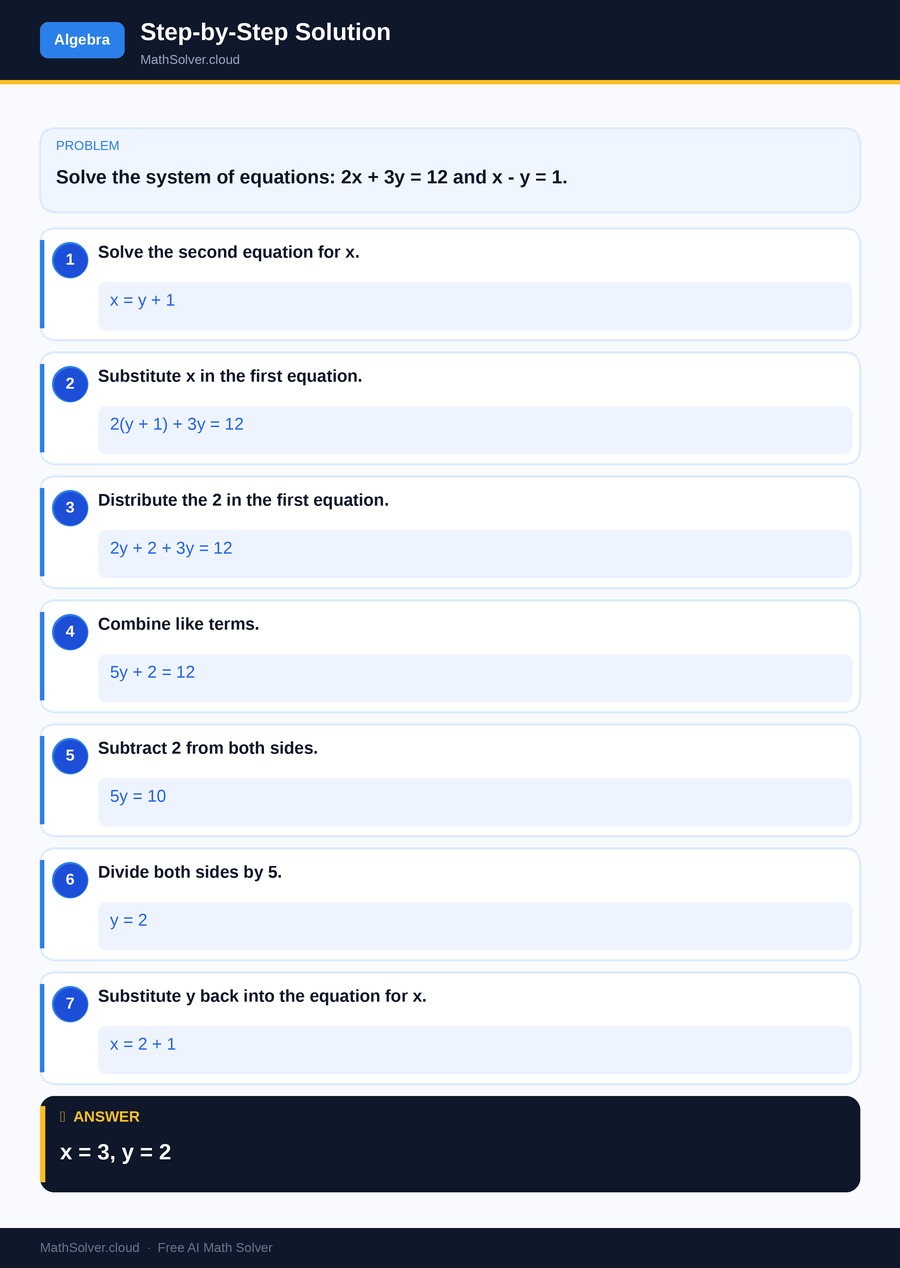
MathSolver Chrome extension solving this problem step-by-step
Example 2

MathSolver Chrome extension solving this problem step-by-step
Common Mistakes to Avoid
One common mistake when using a system of equations calculator is inputting incorrect coefficients or constants. This can lead to completely wrong solutions, so it's vital to double-check each equation before running the calculation. Another frequent error is misinterpreting the calculator's output, especially if it provides solutions in a different form than expected. Always ensure the output aligns with the original problem context.
Another pitfall is relying too heavily on the calculator without understanding the underlying processes. While calculators are helpful, they should complement, not replace, your understanding of solving systems of equations. Use the calculator as a tool to verify your work and help clarify complex problems rather than as a crutch.
Real-World Applications
Systems of equations calculators have numerous real-world applications, particularly in fields that require precise calculations, such as engineering and economics. Engineers use them to solve problems related to forces and movements in structures, ensuring safety and efficiency. Economists might use systems of equations to model and predict economic outcomes, taking into account various variables and constraints.
In everyday life, these calculators can aid in budgeting and financial planning. For instance, if you're trying to determine the best combination of investments to achieve a certain return, a system of equations calculator can help you analyze different scenarios and constraints to make informed decisions.
Frequently Asked Questions
❓ What is a system of equations calculator and how can it help me?
❓ Why do I need to learn how to solve systems of equations?
❓ How can AI help with a system of equations calculator?
❓ Can I use a system of equations calculator for 3 or more variables?
❓ How do systems of equations relate to quadratic equations?
🚀 Solve any math problem instantly
2,000+ students use MathSolver every day — join them for free
📥 Add to Chrome — It's Free