Mastering the Equation Calculator
📋 In this guide
An equation calculator is a powerful tool that aids students and professionals in solving mathematical equations quickly and accurately. These calculators are essential for those who find themselves struggling with complex equations or simply want to verify their solutions. Many students often face difficulties when working with equations due to the abstract nature of math and the multiple steps involved in solving them. By using an equation calculator, students can not only check their work but also learn the correct steps to arrive at the solution. In this article, you'll learn what an equation calculator is, how it works, and how to use it effectively to solve various types of equations.
The equation calculator is especially beneficial because it can handle a wide range of equations, from simple linear equations to more complex quadratic and differential equations. Students often struggle with these equations due to the need for a deep understanding of mathematical principles and the precision required in each step. By learning how to use an equation calculator, students can gain confidence in their math skills and improve their problem-solving abilities.
This article will provide a comprehensive guide on using an equation calculator, covering the key formulas and definitions, step-by-step instructions, and worked examples. Additionally, we will discuss common mistakes to avoid, real-world applications, and answer frequently asked questions. Whether you're dealing with a quadratic equation calculator, a differential equation calculator, or need to solve equations of any kind, this guide will help you master the use of equation calculators.
Step-by-Step: How to Solve Equation Calculator
Step 1: Identify the Type of Equation
The first step in using an equation calculator is to identify the type of equation you are dealing with. Equations can be linear, quadratic, cubic, or even differential. For example, a linear equation has the form ax + b = c, while a quadratic equation is ax^2 + bx + c = 0. Recognizing the type of equation is important because it determines the method and calculator tool you will use. Some equations may require a specific tool like a quadratic equation calculator or a differential equation calculator. By accurately identifying the equation type, you set the groundwork for solving it efficiently.
Step 2: Enter the Equation Correctly
Once you have identified the type of equation, the next step is to enter it accurately into the equation calculator. Pay close attention to the coefficients and constants, as any error in entry can lead to incorrect solutions. Most equation calculators have a user-friendly interface that prompts you to input the equation in the correct format. For example, if you are using a linear equation calculator, you would input the equation in the form of ax + b = c. Ensure that all parentheses are correctly placed and that you follow the calculator's syntax guidelines, which are usually straightforward.
Step 3: Select the Appropriate Solving Method
After entering the equation, choose the appropriate solving method if the equation calculator provides multiple options. Some calculators offer different solving techniques, such as the elimination method, substitution method, or graphical method for linear equations. For quadratic equations, you might have options like factoring, using the quadratic formula, or completing the square. Selecting the right method depends on your comfort level with each approach and the complexity of the equation. The equation calculator will often recommend the most efficient method for the equation type you are solving.
Step 4: Interpret the Results
Once the equation calculator provides the solution, the final step is to carefully interpret the results. The calculator will typically display the value of the variable that satisfies the equation, along with any additional steps or graphs that illustrate the solution process. Verify that the solution makes sense in the context of the problem you are solving. For instance, check if the solution is within a reasonable range or if there are multiple solutions. Understanding the results helps reinforce your mathematical knowledge and ensures that you can apply the solution to real-world problems.
🤖 Stuck on a math problem?
Take a screenshot and let our AI solve it step-by-step in seconds
⚡ Try MathSolver Free →Worked Examples
Example 1

MathSolver Chrome extension solving this problem step-by-step
Example 2
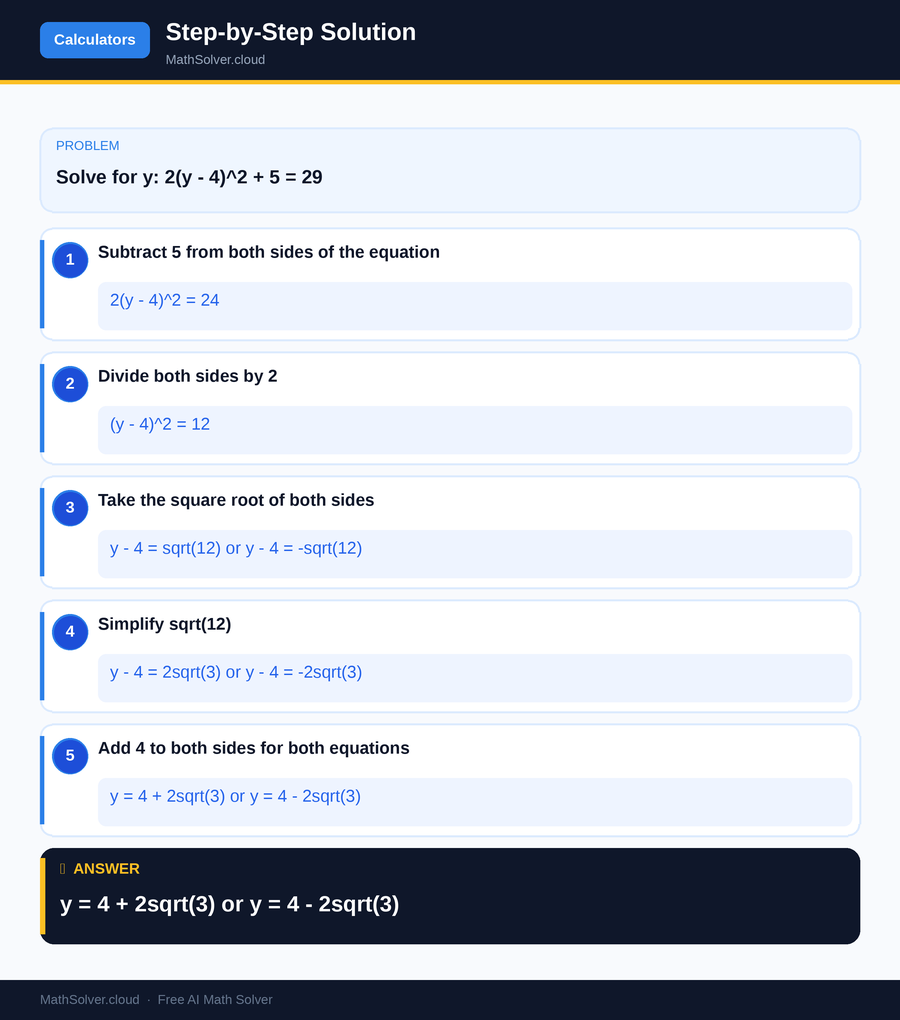
MathSolver Chrome extension solving this problem step-by-step
Common Mistakes to Avoid
One common mistake students make when using an equation calculator is entering the equation incorrectly. Misplacing parentheses or misidentifying coefficients can lead to incorrect solutions. To avoid this error, double-check your equation before submitting it to the calculator. Another frequent mistake is misinterpreting the results given by the calculator. Students might overlook additional solutions or fail to consider the context of the problem. It's important to review the solution thoroughly and ensure it aligns with what the problem requires.
Additionally, over-reliance on equation calculators without understanding the underlying concepts can hinder learning. While calculators are valuable tools, they should complement your understanding of the math theory behind the equations. Practice solving equations manually to strengthen your skills and use the calculator as a validation tool.
Real-World Applications
Equation calculators are not just academic tools; they have practical applications in various fields. Engineers use them to solve complex calculations required in designing infrastructure, machinery, and electronics. For example, a balance equation calculator might be used to ensure that all forces and moments in a mechanical system are properly accounted for.
In finance, equation calculators help in modeling economic scenarios and solving algebraic equations related to interest rates and investment returns. Scientists employ differential equation calculators to model natural phenomena, such as population growth or chemical reactions, where precise calculations are crucial for accurate predictions. These examples highlight the versatility and necessity of equation calculators in real-world problem-solving.
Frequently Asked Questions
❓ How can an equation calculator help me with my homework?
❓ What is the difference between a quadratic equation calculator and a linear equation calculator?
❓ How can AI help with equation calculators?
❓ Can an equation calculator solve differential equations?
❓ How do I choose the right equation calculator for my needs?
🚀 Solve any math problem instantly
2,000+ students use MathSolver every day — join them for free
📥 Add to Chrome — It's Free