Mastering the Cubic Equation Calculator
📋 In this guide
A cubic equation calculator is a powerful tool that can simplify the often complex process of solving cubic equations. These equations, which take the form ax^3 + bx^2 + cx + d = 0, can be particularly challenging for students due to their non-linear nature and the multiple steps required to find their solutions. Students often struggle with these equations because they involve not only basic algebra but also higher-level concepts such as factoring, synthetic division, and the use of formulas for finding roots. Understanding how to effectively utilize a cubic equation calculator can greatly enhance one's ability to solve these equations with confidence.
In this article, we will explore what a cubic equation calculator is, how it works, and why it is an invaluable resource for students tackling these mathematical challenges. By the end of this guide, you will be equipped with the knowledge to use a cubic equation calculator to find solutions efficiently and accurately. We will cover key formulas, step-by-step instructions, and worked examples to illustrate the process. Additionally, we will address common mistakes and real-world applications to provide a comprehensive understanding of cubic equations.
Whether you're a student preparing for exams or someone who frequently encounters cubic equations in your field, mastering the use of a cubic equation calculator can save you time and prevent errors. We will delve into not only the mechanics of these calculators but also their practical implications in various contexts. Ready to simplify your mathematical journey? Let’s dive in!
Step-by-Step: How to Solve Cubic Equation Calculator
Step 1: Inputting the Coefficients
The first step in using a cubic equation calculator is to identify and input the coefficients of the equation. These coefficients are the numerical values that multiply each term of the equation. For example, in the equation 2x^3 - 4x^2 - 22x + 24 = 0, the coefficients are a = 2, b = -4, c = -22, and d = 24. Make sure to input these values accurately into the calculator to obtain correct results. Understanding the significance of each coefficient is crucial as they determine the shape and position of the cubic function on a graph.
Step 2: Using the Calculator Interface
Once the coefficients are entered, the next step is to familiarize yourself with the calculator interface. Most cubic equation calculators offer a simple user interface where you can input values and execute calculations with a click of a button. Some advanced calculators also provide options to view intermediate steps, which can be helpful for learning purposes. This feature is particularly useful in a cubic equation calculator with steps, as it allows you to comprehend the logic behind each calculation rather than just seeing the final answer.
Step 3: Interpreting the Results
After executing the calculation, the cubic equation calculator will display the roots of the equation. These roots can be real or complex numbers. Real roots are straightforward and can be plotted on a number line, while complex roots have a real part and an imaginary part, typically expressed in the form a + bi. Understanding the nature of these roots is important, as it provides insights into the behavior of the cubic function. If you're using a roots of cubic equation calculator with steps, you'll also be able to see how each root was derived.
Step 4: Verifying the Solution
The final step is to verify the solution obtained from the cubic equation calculator. This can be done by substituting the roots back into the original equation to ensure they satisfy the equation. This step is crucial to avoid errors and confirm the accuracy of the solution. For those who prefer manual calculations, you can use synthetic division or factorization methods to cross-check the results. Additionally, tools like the delta math calculator can be used to verify the solutions graphically by plotting the function and observing where it intersects the x-axis.
🤖 Stuck on a math problem?
Take a screenshot and let our AI solve it step-by-step in seconds
⚡ Try MathSolver Free →Worked Examples
Example 1
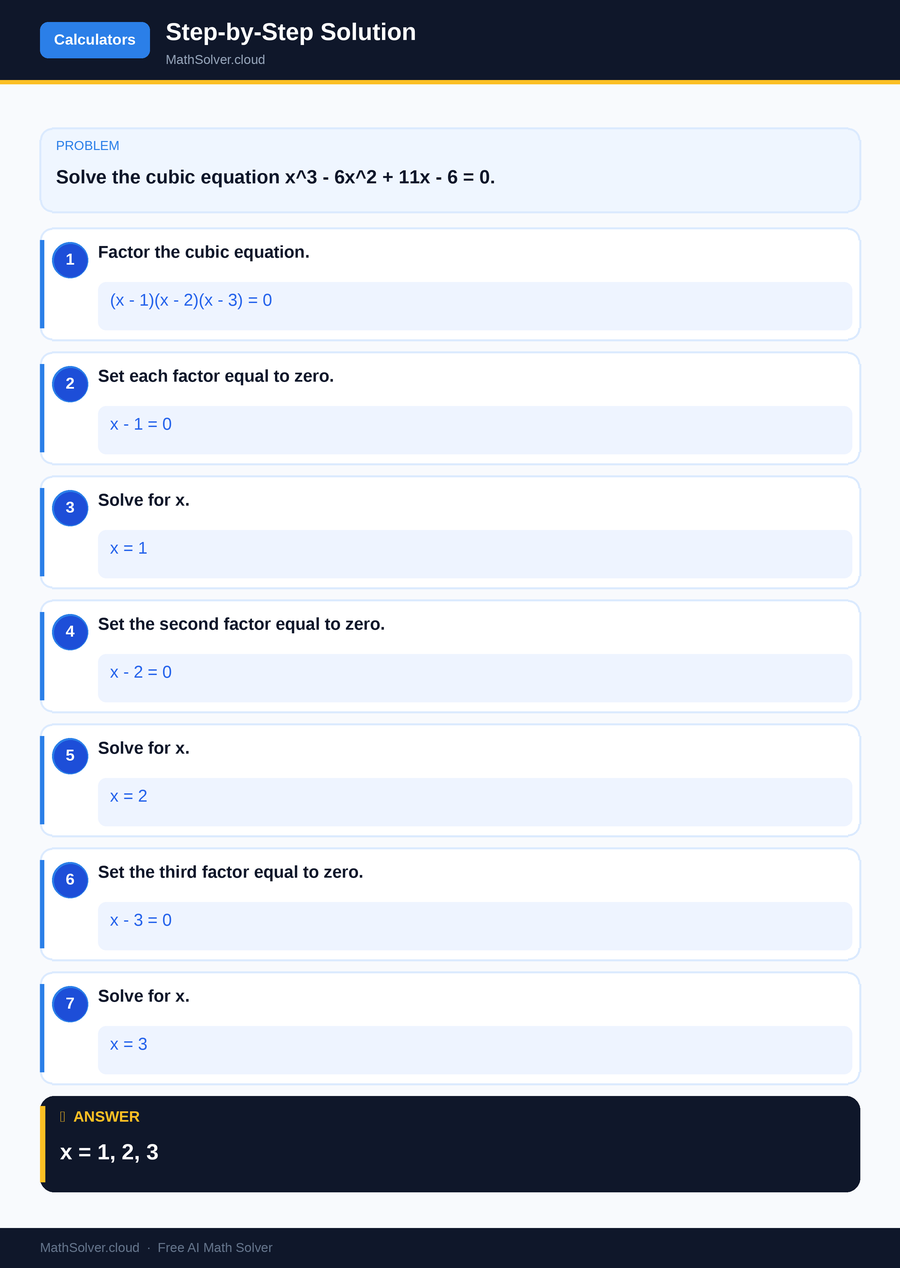
MathSolver Chrome extension solving this problem step-by-step
Example 2
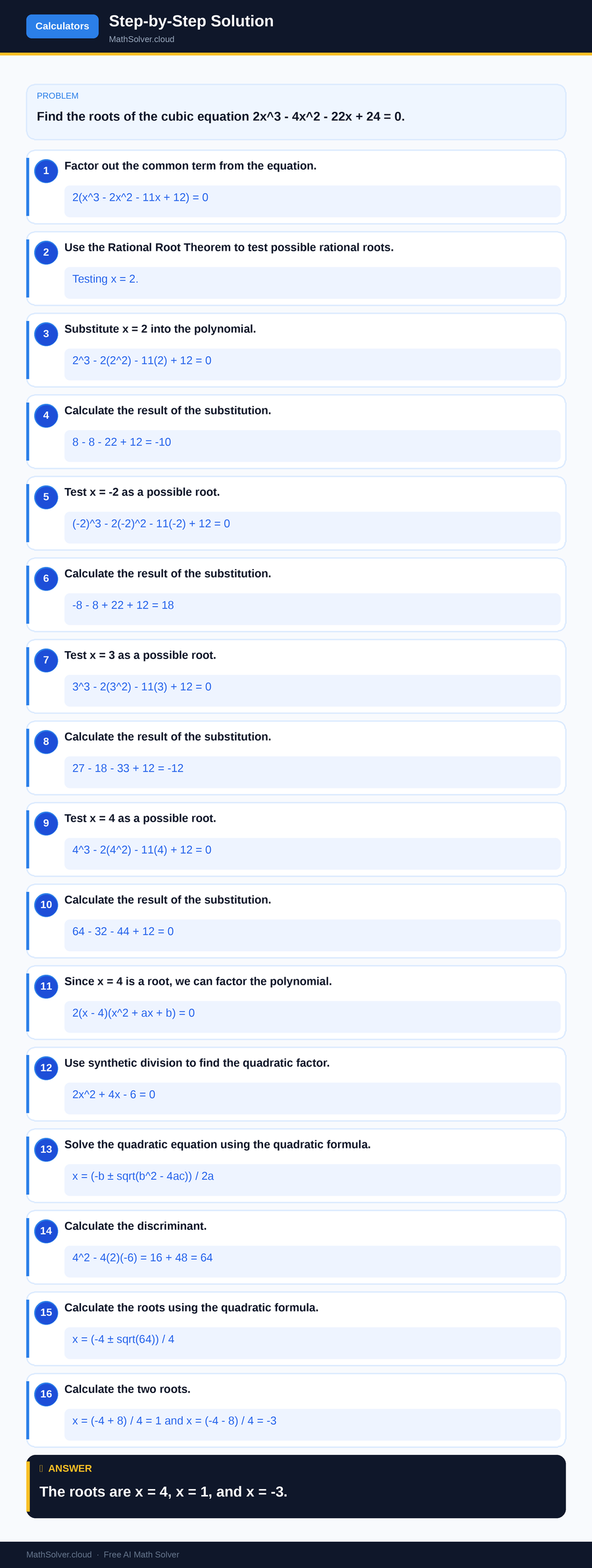
MathSolver Chrome extension solving this problem step-by-step
Common Mistakes to Avoid
One common mistake when using a cubic equation calculator is entering incorrect coefficients. This can lead to incorrect solutions, so it's crucial to double-check each input value before proceeding with the calculation. Another frequent error is misinterpreting complex roots. Remember that complex roots occur in conjugate pairs, and understanding their representation is essential for correctly analyzing the equation's solution.
Additionally, students often overlook the importance of verifying their solutions. Even when using a calculator, manually substituting the roots back into the original equation is a good practice to ensure accuracy. This step helps catch any potential errors made during input or calculation, providing an extra layer of assurance that the solution is correct.
Real-World Applications
Cubic equations have numerous real-world applications across various fields, making the cubic equation calculator a valuable tool beyond academic settings. For instance, in engineering, cubic equations are used to model and solve problems related to fluid dynamics, structural analysis, and thermodynamics. Understanding the roots of these equations can help engineers design more efficient systems and predict potential issues.
In economics, cubic equations are often used to model and analyze economic growth, market trends, and consumer behavior. By applying a cubic equation calculator, economists can quickly assess different scenarios and make informed decisions. These applications highlight the practical significance of mastering cubic equations and the tools used to solve them, such as the texas instruments 30xiis scientific/math calculator - orange, which supports advanced mathematical functions including cubic equations.
Frequently Asked Questions
❓ What is the best way to use a cubic equation calculator effectively?
❓ Why do students find cubic equations challenging?
❓ How can AI help with solving cubic equations using a calculator?
❓ What is the importance of verifying roots in a cubic equation?
❓ Can a cubic equation calculator be used for other types of equations?
🚀 Solve any math problem instantly
2,000+ students use MathSolver every day — join them for free
📥 Add to Chrome — It's Free